Reminders
A reminder is a repeating task, for example "Take medication" every day at 9:00, for one or more mothers or babies. Each day, the receiver gets a phone notification 10 minutes before and ticks the task off in the app.
- Location: Reminder
- Who can do this: staff whose role has the Reminder permissions (view, add, edit, delete)
Staff can also set a one-off next reminder while recording a report. Those appear in the app like any other reminder.
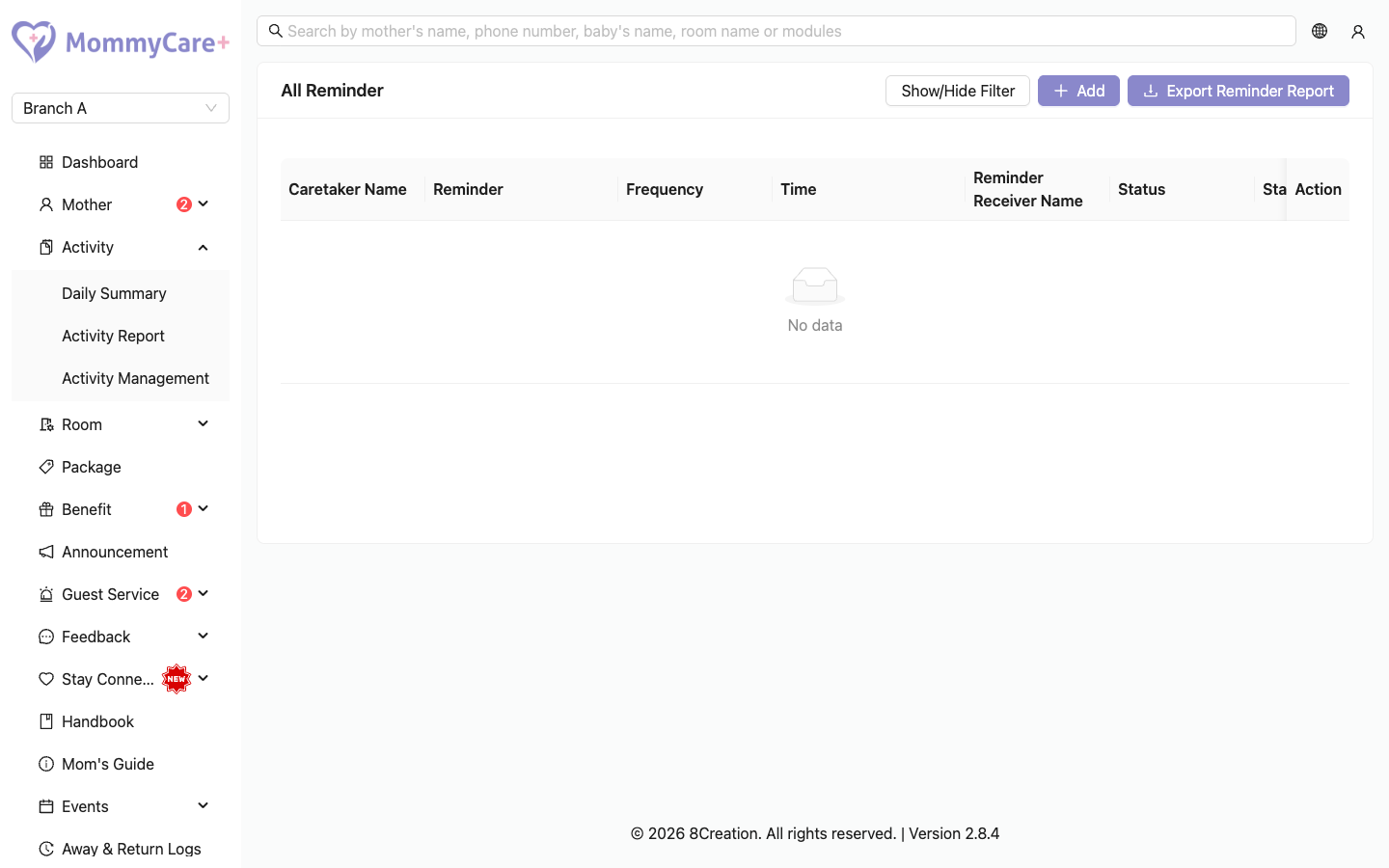
The list shows each reminder's name, how often it repeats (for example "Once in 2 weeks"), the time, the receivers, the status, the start date, and who changed it last.
Reminder statuses
| Status | Meaning | What you can do |
|---|---|---|
| Ready | Saved, and hasn't started yet | Edit, duplicate, delete |
| Active | Running: tasks are created each day | Edit, duplicate, deactivate |
| Inactive | Paused | Edit, duplicate, activate |
| Expired | Finished, because every mother or baby it was for checked out or was deactivated | Duplicate only |
| Unassigned (tag) | No staff receiver is left, so no tasks are created | Edit it and choose receivers again |
How to add a reminder
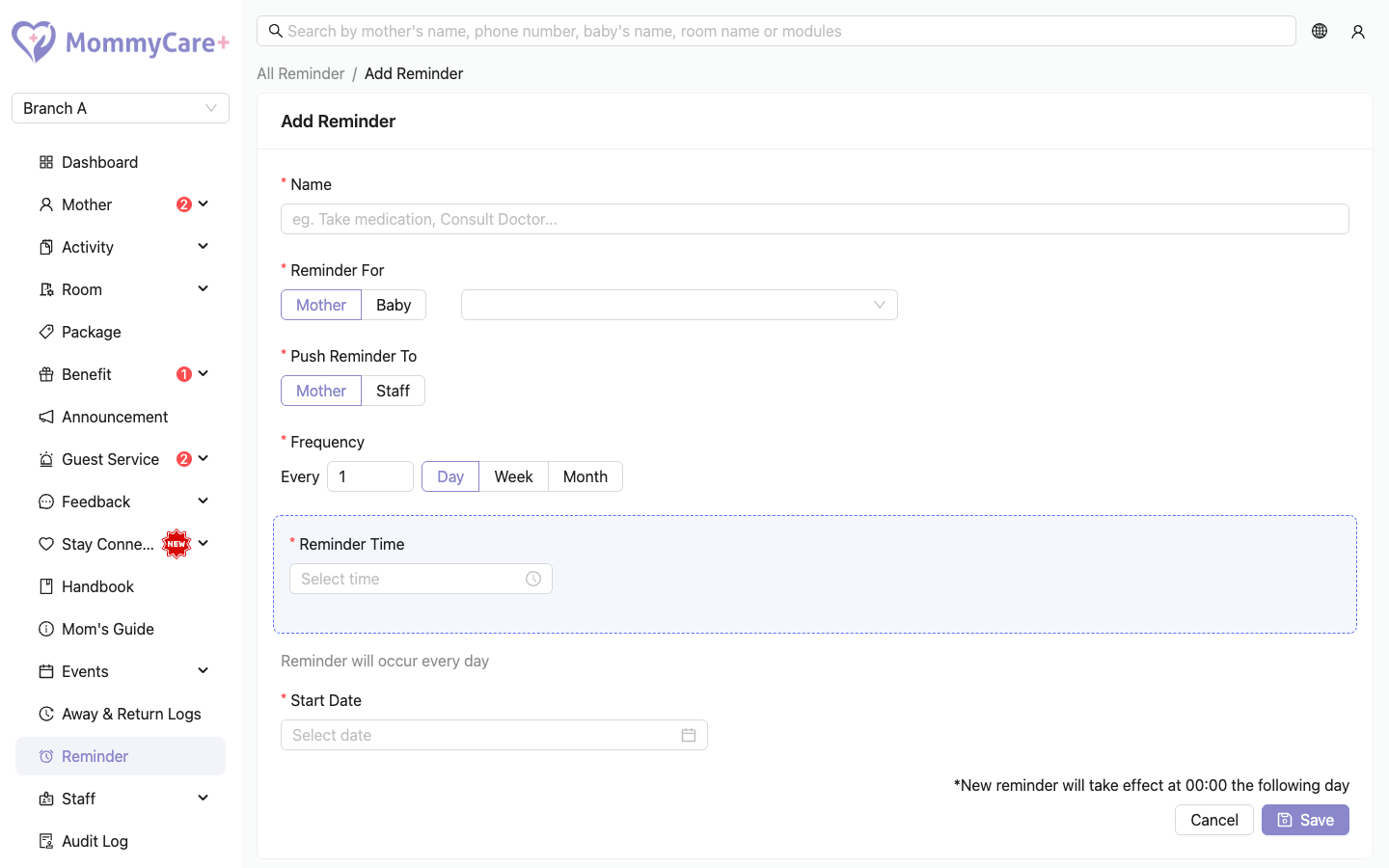
- Click Add.
- Enter a Name, for example "Take medication".
- Under Reminder For, choose Mother or Baby, then one or more of them.
- Under Push Reminder To, choose who must do it:
- Mother: each mother is reminded about herself or her babies
- Staff: choose one or more staff. If you picked one mother or baby, only the staff in charge of her stay are offered. If you picked several, all Staff App users are offered.
- Choose how often it repeats: every few days, weeks (choose the weekday) or months (choose the day of the month).
- Choose the time and the start date.
- Click Save.
The reminder is saved as Ready, and becomes Active when it starts.
- If you create a reminder for a time that has already passed today, today's task is still created and its notification goes out straight away.
- A monthly reminder on day 31 runs on the last day of shorter months.
How to edit or activate a reminder
- Click Edit (or Activate for an inactive reminder).
- Make your changes and click Save.
Changes take effect in the app from 00:00 the next day. Today's tasks stay as they were.
How to duplicate a reminder
Click Duplicate. The form opens with the same name and schedule. Choose the mothers or babies and receivers, and save. This is the way to reuse an expired reminder.
How to deactivate or delete a reminder
- Deactivate: click Deactivate and confirm. No new tasks are created from tomorrow. Today's tasks stay.
- Delete: click the Delete icon and confirm. Only Ready reminders can be deleted. Deactivate the others.
How to export who completed reminders
- Click Export Reminder Report.
- Choose the mother or baby and the date range.
- Choose Download Excel or Export via Email.
The file has one row per day and one column per reminder. Each cell shows who completed it. A task that wasn't done shows the name of the person who should have done it, in red.
What happens automatically
| When | What happens |
|---|---|
| A mother checks out, or is deactivated | Her and her babies' reminders become Expired. A baby who stays in the centre keeps their reminders. |
| A baby is deactivated | The baby's reminders become Expired |
| A staff member is deactivated or loses Staff App access | They are removed as a receiver |
| A staff member is no longer in charge of a mother's stay | They are removed as a receiver of her reminders |
A reminder left with no receivers shows Unassigned.
Ticking off reminders
Mothers tick off their reminders on the Mother App Home screen. Staff tick them off on the mother's or baby's details in the Staff App. When the last task of the day is ticked, the app asks to confirm "Complete all reminders?". After that, the day's list is locked.
Troubleshooting
| What you see | Why, and what to do |
|---|---|
| Unassigned on a reminder | Its staff receivers were removed. Edit it and choose receivers again. |
| No staff are offered as receivers | You picked one mother, and nobody is in charge of her stay. Add a Staff In Charge to her stay first. See Onboard & check in. |
| "Reminders can only be deleted when the status is pending." | Only Ready reminders can be deleted. Deactivate it instead. |
| "The reminder has already expired and can no longer be modified." | Use Duplicate. |
| "This action is invalid because the reminder target is inactive." | One of the mothers or babies is inactive. Remove them, or activate them. |
| "This action is invalid because the staff member is inactive." | One of the staff is inactive. Choose someone else. |
| A change didn't show in the app | Changes apply from 00:00 the next day. |
| A staff member got no notification | They are Off duty (it still appears in their notifications list), or they aren't a receiver. |
| Someone can't untick a reminder | All of today's tasks for that mother or baby are done, so the list is locked for the day. |