App settings
These settings control what mothers and staff see in the app, for the branch you're in.
- Location: Setting → App
- Who can do this: staff whose role has Manage App Setting
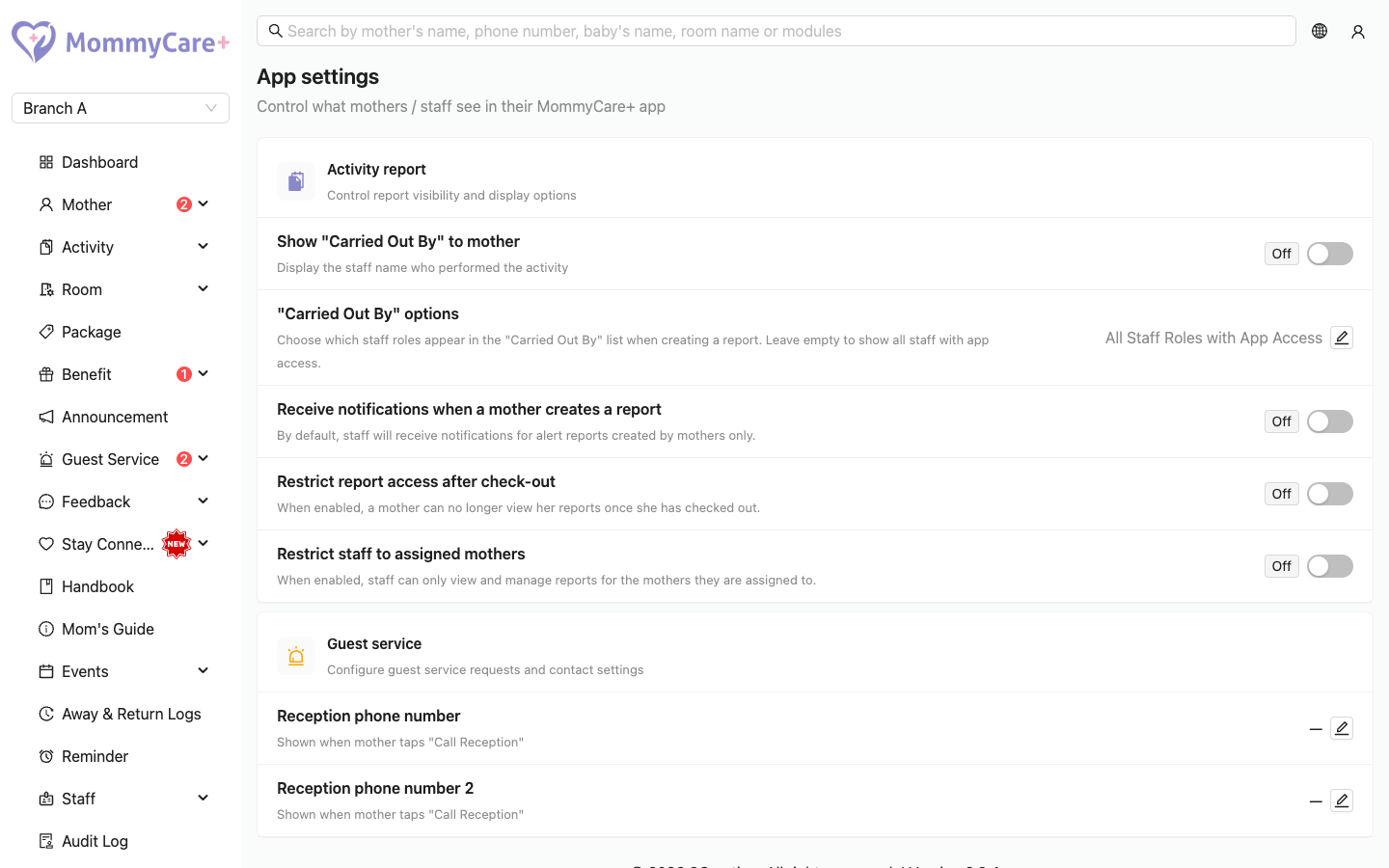
How to change a setting
- Go to Setting → App.
- For an on/off setting, click its switch. The change is saved straight away.
- For a phone number or the "Carried Out By" options, click the pencil (Edit) icon, make the change and click Save.
Every change is recorded in the Audit Log.
Activity report settings
| Setting | What it does |
|---|---|
| Show "Carried Out By" to mother | The mother sees the name of the staff member who carried out each activity in her reports. Off: the name is hidden from her. |
| Receive notifications when a mother creates a report | Staff get a "New <activity> Report Submitted by Mother <name>" notification for every report a mother records. Off (default): staff are only told about mothers' reports that have an alert. |
| Restrict report access after check-out | After check-out, the mother can no longer see the reports from that stay. A baby's reports stay visible while that baby is still staying in the centre. |
| Restrict staff to assigned mothers | Staff can only see, create, edit and delete reports for the mothers they are in charge of. Report alerts and mothers' report notifications go only to those staff and the centre owner. |
| "Carried Out By" options | Choose which staff roles appear in the Carried Out By list when staff create a report. Leave it empty to list all staff with Staff App access. |
caution
With Restrict staff to assigned mothers on, only the centre owner can edit or delete reports in the Portal.
Guest service settings
| Setting | What it does |
|---|---|
| Reception phone number and Reception phone number 2 | Shown to a mother when she taps Call Reception. She can do this when a service request has waited for more than a minute. It opens WhatsApp. |
Troubleshooting
| What you see | Why, and what to do |
|---|---|
| Setting → App isn't in the menu | Your role doesn't have Manage App Setting. |
| A mother can't see who did an activity | Show "Carried Out By" to mother is off. |
| A mother can't see an old stay's reports | Restrict report access after check-out is on. |
| A nurse can't see some mothers' reports, or got no alert | Restrict staff to assigned mothers is on, and the nurse isn't in charge of that mother. |
| Staff aren't told when a mother records a normal report | Receive notifications when a mother creates a report is off. |
| Call Reception shows no number | No reception phone number is set. |